Know what to collect before you leave the shop
Set how much each truck should carry. When available stock reaches its minimum, My Truck shows what can be collected from the shop and what is still needed.
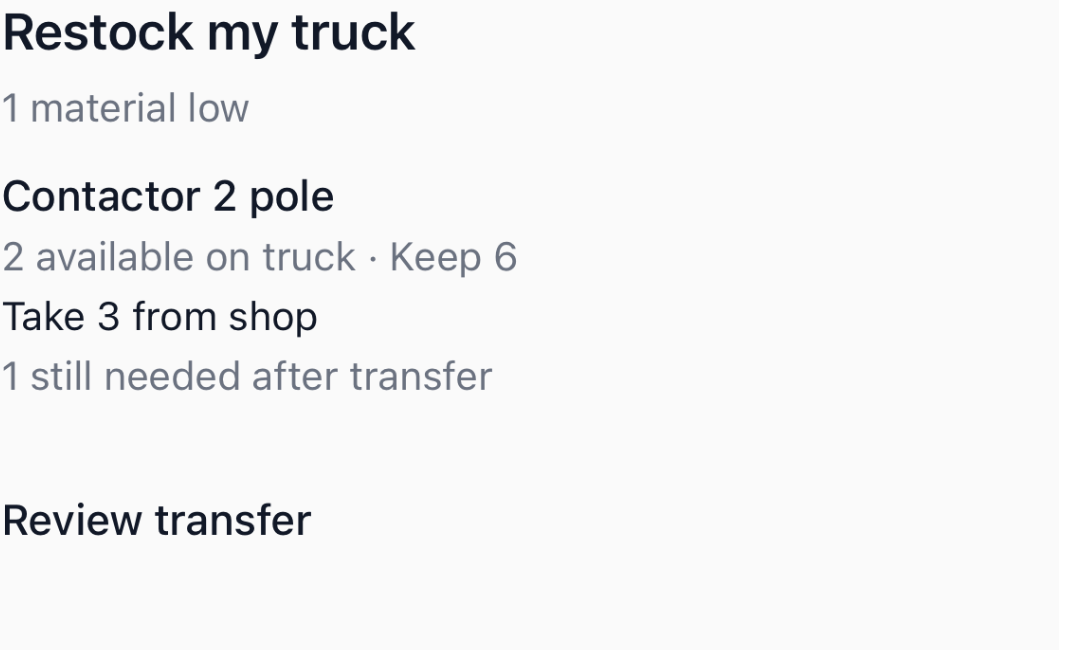
A minimum to trigger. A quantity to refill to.
Keep six contactors on the truck, but wait until two are available before asking for a restock. Each truck has its own levels. A reusable stocking template copies your standard list to other trucks without tying their future settings together.
With two on the truck and three free at the shop, collect three. The truck reaches five, and the remaining need stays at one.
Parts reserved for jobs stay protected. A suggested transfer is checked again when you confirm what you loaded.
Try the same example with your quantitiesTrack incoming parts separately from truck stock.
An order allocated to this truck reduces the amount you need to buy again. It does not appear as stock on the truck. Receive it at the shop, then confirm the transfer when it is loaded.
Start with an editable truck stock list, or see how supplier purchasing handles the shortage.